 The DTF Printing CompanyA Magic Touch Promotions brand
The DTF Printing CompanyA Magic Touch Promotions brand
The DTF Printing CompanyA Magic Touch Promotions brand
Check your files before you order, whether you build a sheet online or upload a finished one.
For the gang sheet builder, add individual designs as PNG, WebP, PDF, SVG or EPS. For a PDF, choose the page you want to use. SVGs must contain printable shapes rather than live text or external content. EPS files must be plain, single-page files with text converted to outlines; they are imported at 300dpi, up to 40 megapixels. Remove any unwanted solid background and review the result before ordering.
Already have a finished gang sheet? Use the product page's finished-sheet upload with a single-page PDF or PNG, up to 100MB. This route has no editor preview. Check the file carefully before you upload it.
Standard DTF, Poly Blocker and UV DTF sheets are 560 x 1000mm. Sublimation sheets are 580 x 1000mm. A finished sheet must match the product size; the builder sets the canvas for you. Leave at least 5mm between designs and at every sheet edge. Send artwork the right way round, without mirroring it.
A 300 x 300mm file can contain a design that is only 200 x 200mm, with empty space around it. At that file size, the visible design is 200mm wide, not 300mm. Check the size of the design itself, rather than relying on the page or file dimensions.
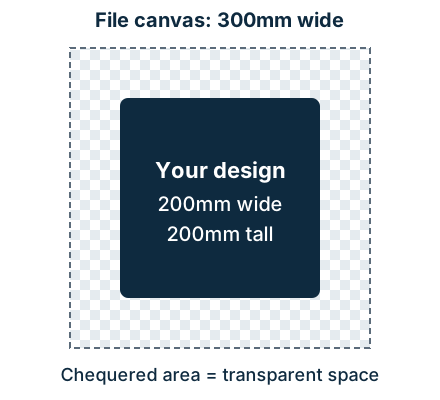
In Canva or other design software: changing the page size alone does not tell you how wide the artwork is. Check the design's dimensions, remove unwanted empty borders from individual artwork, and keep its proportions when resizing. Check the exported file before uploading.
In our builder: fully transparent outer borders are trimmed on import. Opaque white borders are not transparent and remain part of the artwork unless you remove them. Always enter your desired print width after uploading, check the resulting height and resolution, and review the proof. The initial imported size is a starting point, not confirmation of your intended print size.
For a finished gang sheet: keep the full 560 x 1000mm canvas, or 580 x 1000mm for sublimation, with 5mm gaps and edge margins. Check each design's visible size within the sheet. Do not crop a completed sheet down to the artwork.
Aim for 300dpi at the final print size. The minimum is 150dpi; the builder warns below 300dpi and blocks output below 150dpi. Enlarging a small image reduces its effective resolution. Changing a file's DPI label or upscaling it does not restore missing detail. Check fine detail at the intended size before ordering.
For standard DTF, Poly Blocker and UV DTF, use transparency wherever you want no print. An opaque white background can become an unwanted white rectangle. White parts of your design should use pure white, #FFFFFF (RGB 255, 255, 255), rather than off-white.
Sublimation does not print white ink. White areas take the colour of the white or light substrate, so a white or transparent background is fine for sublimation. Check that the blank is suitable for sublimation.
Supply artwork in RGB, preferably sRGB. Colours on a screen can differ from the finished transfer, so ask us before ordering if a colour match is critical.
For standard DTF and UV DTF, avoid feathered edges, soft shadows and colour that fades into transparency. The white ink underneath shows through these partially transparent areas, so the edge can print white instead of fading away. A colour blend inside fully opaque artwork is different from a fade into transparency.
For a faded-edge effect, supply print-ready halftone artwork: solid dots with fully transparent gaps between them. The gaps must be transparent, not filled with white. The builder does not currently convert fades to halftones. If you're unsure about the result or fine dot detail, contact us before ordering.
Keep text above 5mm cap height. Keep lines and strokes at least 0.018 inch thick (0.4572mm, approximately 0.46mm) at print size. These are separate measurements: the line rule does not replace the text-height rule. Thin details or tiny gaps can disappear even when the overall image resolution is high.
In the builder, use the rendered proof to check every design, quantity, size and background before you approve the sheet and continue to payment. The proof shows the layout, not a guaranteed colour match. For finished-sheet uploads, review your file in your own software first: there is no editor preview after upload. We check printability, but do not silently redraw artwork, correct spelling or change your layout. If you need help, contact us before ordering.